
Email marketing remains one of the simplest ways for a small business to maintain a direct relationship with people who have chosen to hear from the company. The channel can support newsletters, product education, onboarding, promotions, customer retention and repeat purchases.
The challenge is not simply sending more emails. A sustainable system needs the right software, a clean audience, useful content, sensible automation and a measurement process. Microsoft’s 2026 small-business guidance highlights permission-based list building, automation, A/B testing, KPI tracking and mobile-friendly design as practical parts of an email strategy.
What email marketing means for a small business
For a small business, email marketing is best treated as a repeatable customer-communication system rather than a series of isolated blasts. A simple loop looks like this:
- Attract: give the right people a reason to subscribe.
- Welcome: explain what they will receive and when.
- Educate: provide useful information related to the problem you solve.
- Promote: make relevant offers when they genuinely fit the audience.
- Retain: keep customers informed and useful after a purchase.
- Measure: learn which topics, segments and calls to action produce meaningful outcomes.

How AI changes email marketing in 2026
AI can assist at several points in an email workflow. Depending on the platform, it may help draft copy, suggest subject lines, personalize content, summarize campaign performance, recommend segments, predict sending times or build parts of an automation.
Mailchimp, for example, documents AI features for email content, subject-line assistance, campaign recommendations, send-time optimization and audience insights. Its 2026 product updates also describe AI-assisted analytics and connections with external AI tools for campaign creation.
Brevo currently describes AI features for email content, segmentation and send-time optimization, alongside automation and reporting. Its current pricing documentation also shows that its free and paid plans differ in sending and automation capabilities.
Where AI is useful
| Task | Useful AI role | Human responsibility |
|---|---|---|
| Subject lines | Generate variations and angles | Check accuracy, tone and whether the subject matches the email |
| Email copy | Draft, shorten, rewrite or adapt tone | Verify facts, offers, claims and brand voice |
| Personalization | Suggest relevant content or product blocks | Confirm the data is correct and appropriate to use |
| Segmentation | Group contacts using behavior or attributes | Define useful segments and avoid misleading assumptions |
| Automation | Help design sequences and workflow logic | Set triggers, exclusions, approvals and fallback rules |
| Analytics | Summarize patterns and suggest tests | Decide what matters based on business goals |
AI personalization & email content
Personalization is more than inserting a first name. Useful personalization changes the content, timing or offer based on information the subscriber has intentionally provided or behavior the business is permitted to use.

Examples of useful personalization
- A new subscriber receives a welcome sequence rather than a sales email meant for existing customers.
- A customer who purchased one product receives relevant education or complementary information.
- A repeat customer receives a different message from someone who has never purchased.
- A subscriber interested in one topic sees content related to that topic instead of a generic newsletter.
- A dormant subscriber receives a carefully designed re-engagement message rather than the same weekly campaign.
Avoid pretending the system knows more than it does. A personalized email based on inaccurate or overly sensitive assumptions can reduce trust quickly.
Email marketing software: features that matter
The right platform depends on list size, sending volume, workflow complexity, integrations and the type of business. Do not choose a platform only because a feature list looks impressive.
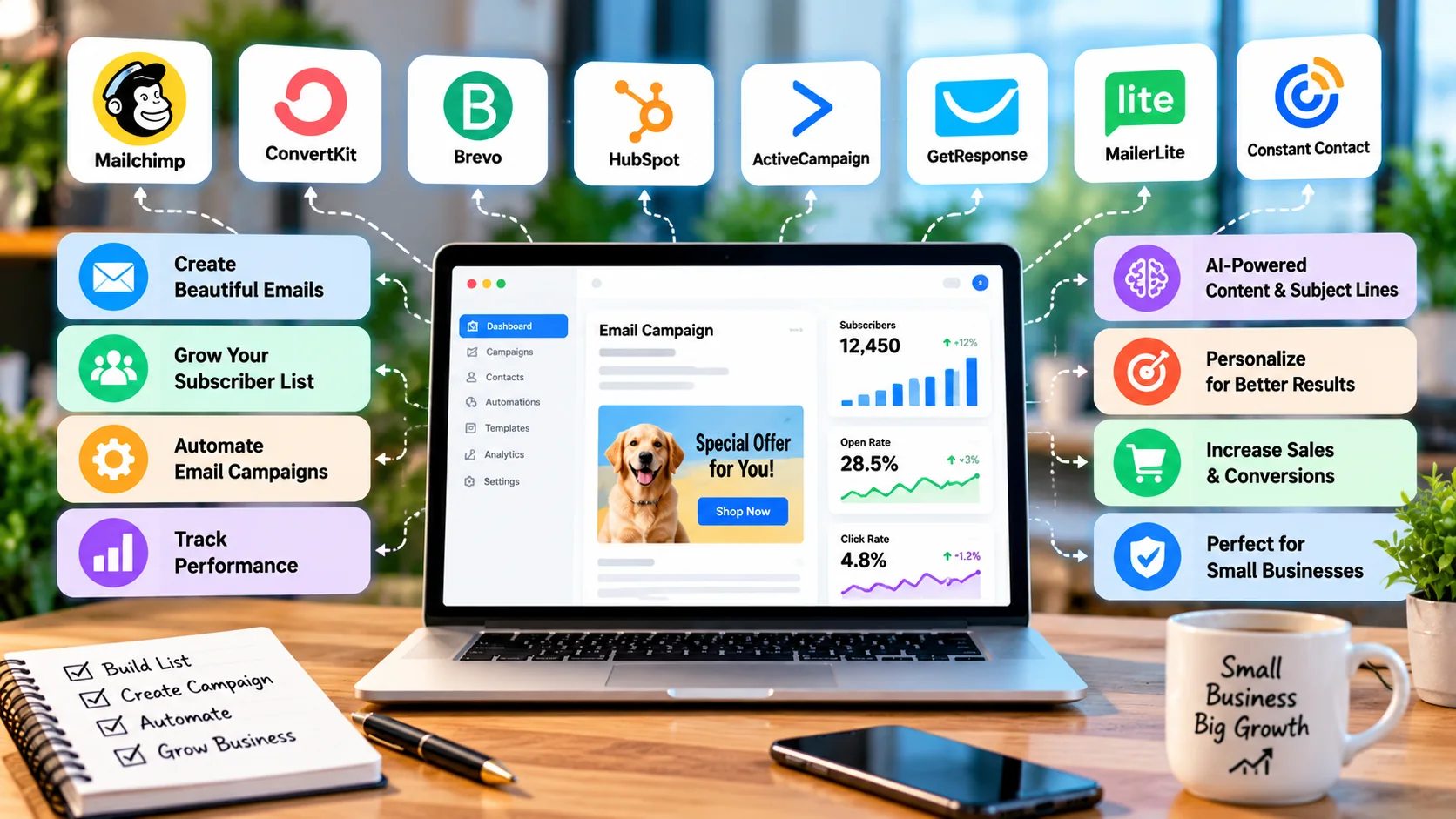
| Feature | Why it matters | What to check |
|---|---|---|
| Contact management | Keeps subscriber records usable | Fields, tags, segments, imports, duplicates and growth limits |
| Email builder | Controls production speed and consistency | Templates, drag-and-drop editing, reusable blocks and mobile rendering |
| Automation | Reduces repetitive campaign work | Triggers, branching, delays, goals, exclusions and limits |
| Segmentation | Lets you send more relevant messages | Behavior, attributes, purchases, engagement and dynamic segments |
| AI features | Can reduce drafting and analysis time | What AI actually does, plan restrictions, data controls and review options |
| Analytics | Shows what happened after sending | Clicks, conversions, revenue/leads, attribution and export options |
| Integrations | Connects email to the rest of the business | Website, ecommerce, CRM, forms, calendar and automation connections |
| Deliverability controls | Supports reliable sending | Authentication, unsubscribe handling, bounce management and domain settings |
How to compare email marketing tools
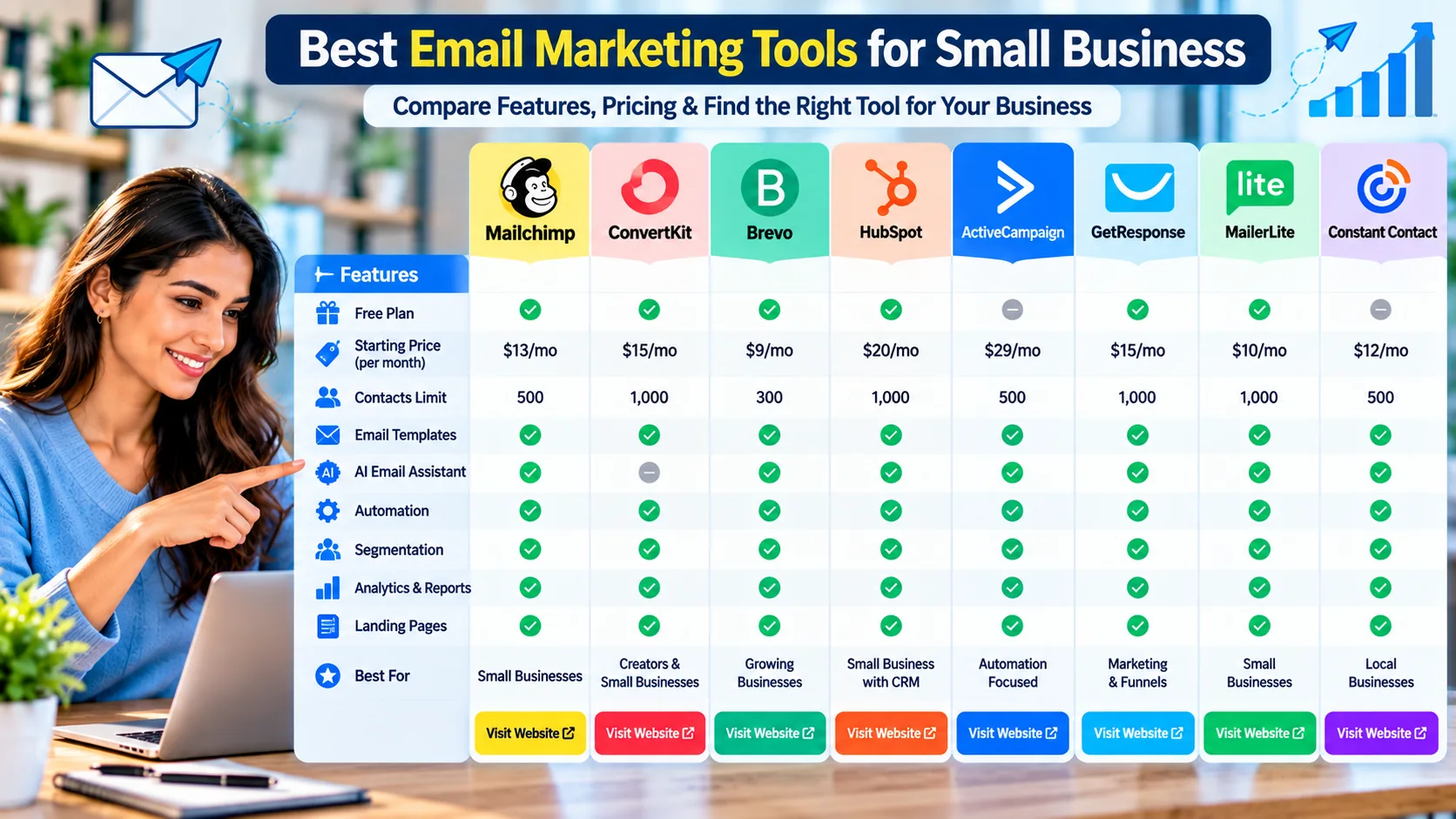
There is no universal “best email marketing software for small business.” The useful comparison is the one that matches your actual requirements. Start with the audience you have today and the workflow you expect to need over the next year.
A practical comparison checklist
- List size: How many contacts do you have now, and how quickly could that number grow?
- Sending volume: Do you send a few newsletters each month or frequent automated messages?
- Automation: Do you need one welcome sequence or a multi-step customer journey?
- Segmentation: Can the platform create the segments you actually need?
- AI: Are AI tools included in your plan, and can you review or control the output?
- Integrations: Can it connect to the website, store, CRM and other systems you already use?
- Analytics: Can you connect email activity to leads, purchases or other meaningful outcomes?
- Total cost: Include contact growth, email volume, add-ons, extra seats and premium features.
What current providers show
Brevo currently lists a free plan, a Starter plan from $9/month and a Standard plan from $18/month, with pricing and features varying by plan. Its documentation describes AI content generation, segmentation and automation.
GetResponse currently lists a Starter plan at $19/month on monthly billing or $15.58/month when billed annually at the displayed starting level, with unlimited monthly sends and AI-powered content tools. Higher plans add broader automation, segmentation and other capabilities.
HubSpot currently lists free tools and a Starter offer with pricing that can vary by billing choice and promotion; its Marketing Hub Professional and Enterprise tiers are substantially more expensive and are aimed at more advanced marketing organizations.
Constant Contact currently lists Lite, Standard and Premium plans, with pricing tied to contact count and email-sending allowances. Its current plans include features such as AI copy generation, automation, segmentation and reporting, with higher tiers adding more advanced capabilities.
Mailchimp currently offers free/trial and paid marketing options, with plan limits and features varying by audience size and plan. Its current product materials document AI content generation, send-time optimization and other AI-assisted marketing features.
For the other tools in the visual comparison, treat the image as a quick orientation rather than a live price sheet. Plan names, prices, free allowances and AI availability can change. Always verify the provider's current pricing and feature page before making a purchase.
How to start email marketing for a small business: step by step
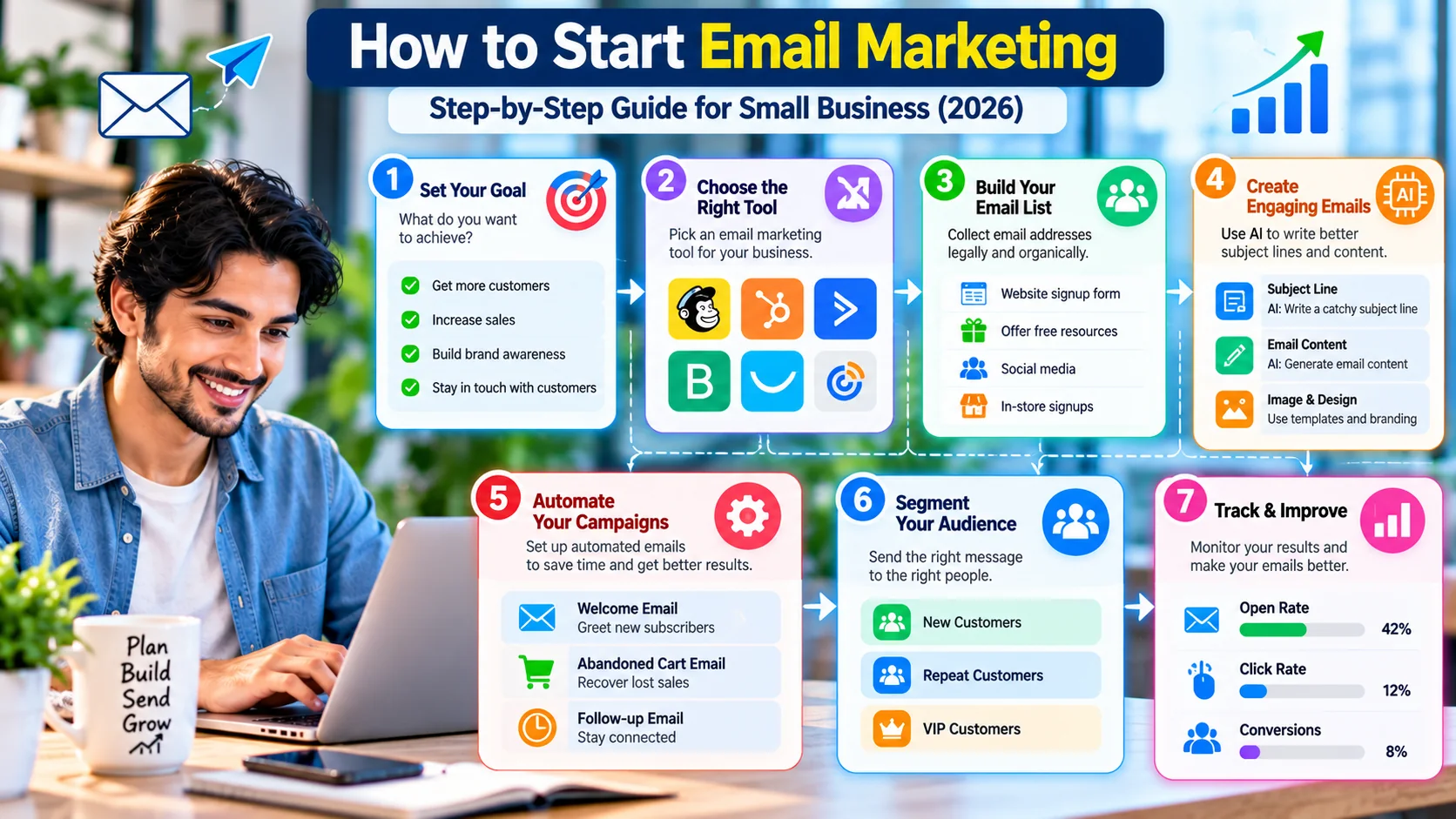
Step 1: Choose one business goal
Pick one primary outcome such as generating qualified inquiries, increasing repeat purchases, educating prospects or improving customer retention. This determines what your emails should ask people to do.
Step 2: Choose your audience
Define who should receive the messages and why. A small, relevant list is more useful than a large list filled with people who never wanted the content.
Step 3: Set up your sending domain correctly
Use your own business domain where appropriate and configure the authentication records required by your email platform. Google currently requires senders to Gmail accounts to meet authentication and sender requirements; bulk senders also need DMARC and one-click unsubscribe for marketing messages.
Step 4: Create the signup path
Use a website form, checkout opt-in or another appropriate acquisition method. Tell subscribers what they will receive and how often. Do not buy lists simply to make the audience number look bigger.
Step 5: Build a welcome sequence
A simple sequence can introduce the business, deliver a useful resource, explain the value of staying subscribed and make a relevant next-step offer.
Step 6: Create a repeatable campaign format
For example: useful insight → short explanation → proof/example → one clear call to action. Consistency makes campaigns easier to produce and easier for readers to understand.
Step 7: Add one automation at a time
Start with welcome emails or a post-purchase sequence. Once it works reliably, add other workflows such as abandoned-cart recovery, lead nurturing or re-engagement where appropriate.
Step 8: Test before sending
Check the sender name, subject line, preview text, links, images, mobile layout, personalization fields, unsubscribe link and tracking. Send yourself a test email before the live campaign.
Email automation workflows that are useful for small businesses
Automation is valuable when it handles a predictable event and produces a predictable next step. The goal is not to automate everything; it is to remove repetitive work without losing control.
| Workflow | Trigger | Typical sequence |
|---|---|---|
| Welcome | New subscriber | Welcome → useful resource → business introduction → relevant offer |
| Lead nurture | New inquiry | Confirmation → educational content → reminder → human follow-up |
| Post-purchase | Purchase completed | Confirmation → usage tips → support → complementary offer |
| Re-engagement | Low engagement | Value reminder → preference update → final re-engagement message |
| Abandoned cart | Cart created but not completed | Reminder → helpful information → optional offer |
Each workflow should have exclusions. For example, someone who has already purchased should not keep receiving a pre-purchase sequence. A subscriber who has opted out should not be re-added by another automation.
Segmentation and personalization
Segmentation makes a small list behave more intelligently. Useful segments can be based on signup source, product interest, customer status, recent engagement, purchase history or an explicit preference.
Keep segments understandable. If you cannot explain why a person belongs in a segment and what different content they should receive, the segment may not be useful.
Email marketing results: what to measure
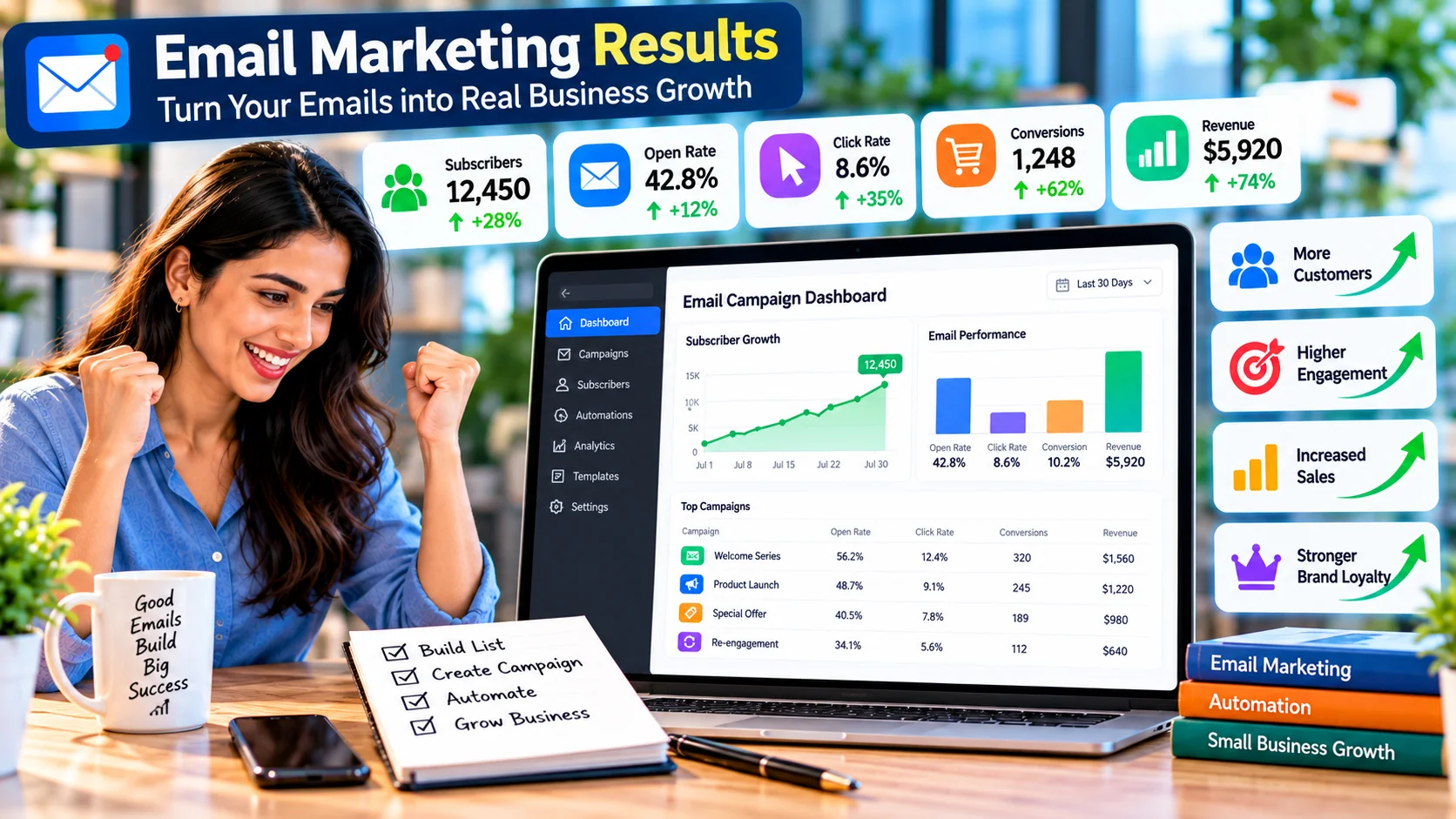
Open rates can be useful as a directional signal, but they are not a complete measure of success. Your primary metrics should reflect the goal you selected at the beginning.
| Metric | What it tells you | Use it with |
|---|---|---|
| Delivered | How many messages reached the receiving system | Bounces and deliverability signals |
| Clicks | Whether recipients interacted with links | Click-through rate and conversion |
| Conversions | Whether the email contributed to the target action | Revenue, leads or bookings |
| Unsubscribes | Whether people are opting out | Content relevance and frequency |
| Spam complaints | Whether recipients are reporting unwanted messages | Permission, targeting and list hygiene |
| Revenue/leads | Business outcome attributed to campaigns | Attribution window and baseline |
Email marketing that works: practical strategy
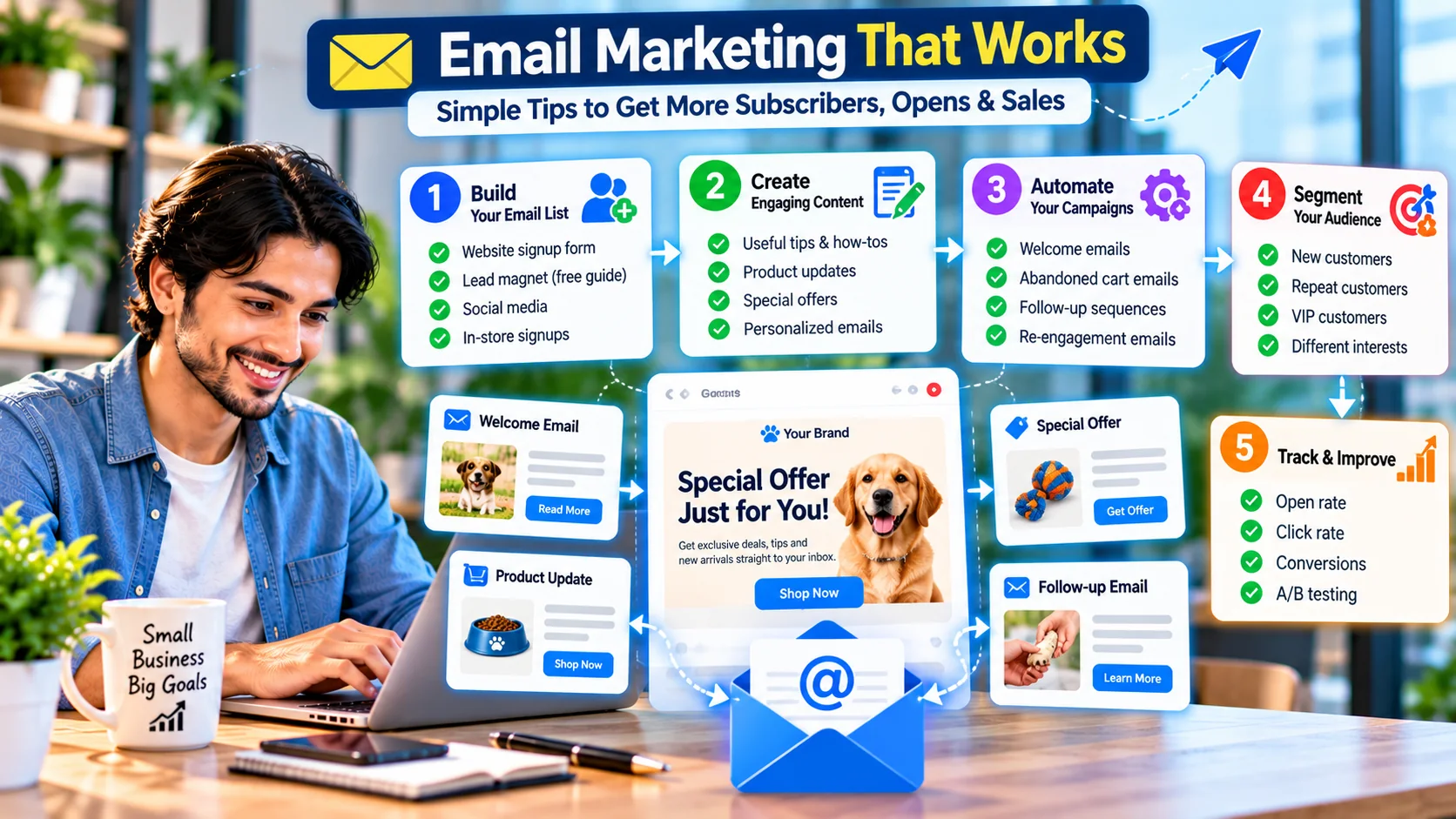
Good email marketing is usually built from a few repeatable habits rather than one clever campaign. Build the list deliberately, create content people expect, automate predictable moments and keep improving based on evidence.
- Build a permission-based list. Make the value of subscribing clear.
- Create useful content. Teach, help, update or offer something relevant.
- Automate predictable moments. Welcome, nurture, post-purchase and re-engagement are common starting points.
- Segment when it changes the message. Do not create dozens of segments that all receive the same email.
- Track outcomes. Use the business goal as the anchor for optimization.
9 email marketing best practices for small business
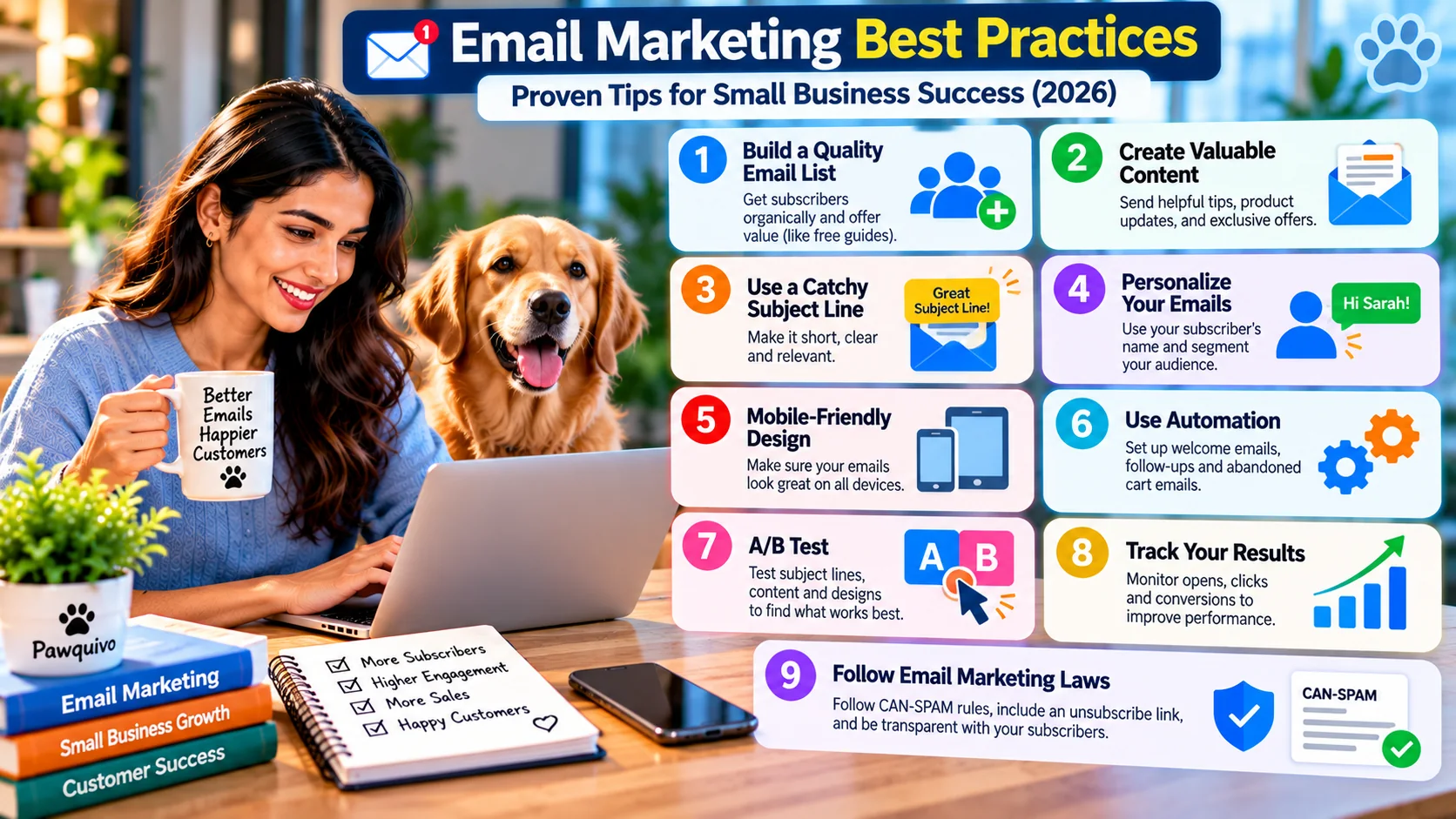
- Use a quality list: collect contacts through appropriate signup and consent processes.
- Set expectations: tell subscribers what they will receive.
- Write useful subject lines: make the promise clear without misleading the reader.
- Personalize carefully: use accurate data and avoid sensitive or creepy assumptions.
- Design for mobile: test readability, buttons, images and layout on small screens.
- Automate carefully: add exclusions and stop conditions.
- A/B test one meaningful variable: subject line, offer, CTA or content—not everything at once.
- Track results: connect email metrics to leads, sales or retention where possible.
- Respect email rules: provide a clear unsubscribe path and follow the requirements that apply in the markets you serve.
Email compliance, privacy and deliverability
Email marketing is both a technical and legal responsibility. In the United States, the FTC's CAN-SPAM guidance covers commercial email and requires accurate header information, non-deceptive subject lines, a valid postal address, a clear opt-out mechanism and prompt handling of opt-out requests. It also makes clear that using a third-party email service does not remove the sender's responsibility.
Google's current Gmail sender guidance requires email senders to use authentication such as SPF or DKIM and maintain appropriate sender practices. For senders reaching 5,000 or more Gmail personal accounts in a day, Google adds requirements including DMARC and one-click unsubscribe for marketing messages.
Rules differ across countries and message types, so this article is not legal advice. If you send internationally, review the privacy, marketing and consent requirements that apply to your audience and business.
10 email marketing tools to research in 2026
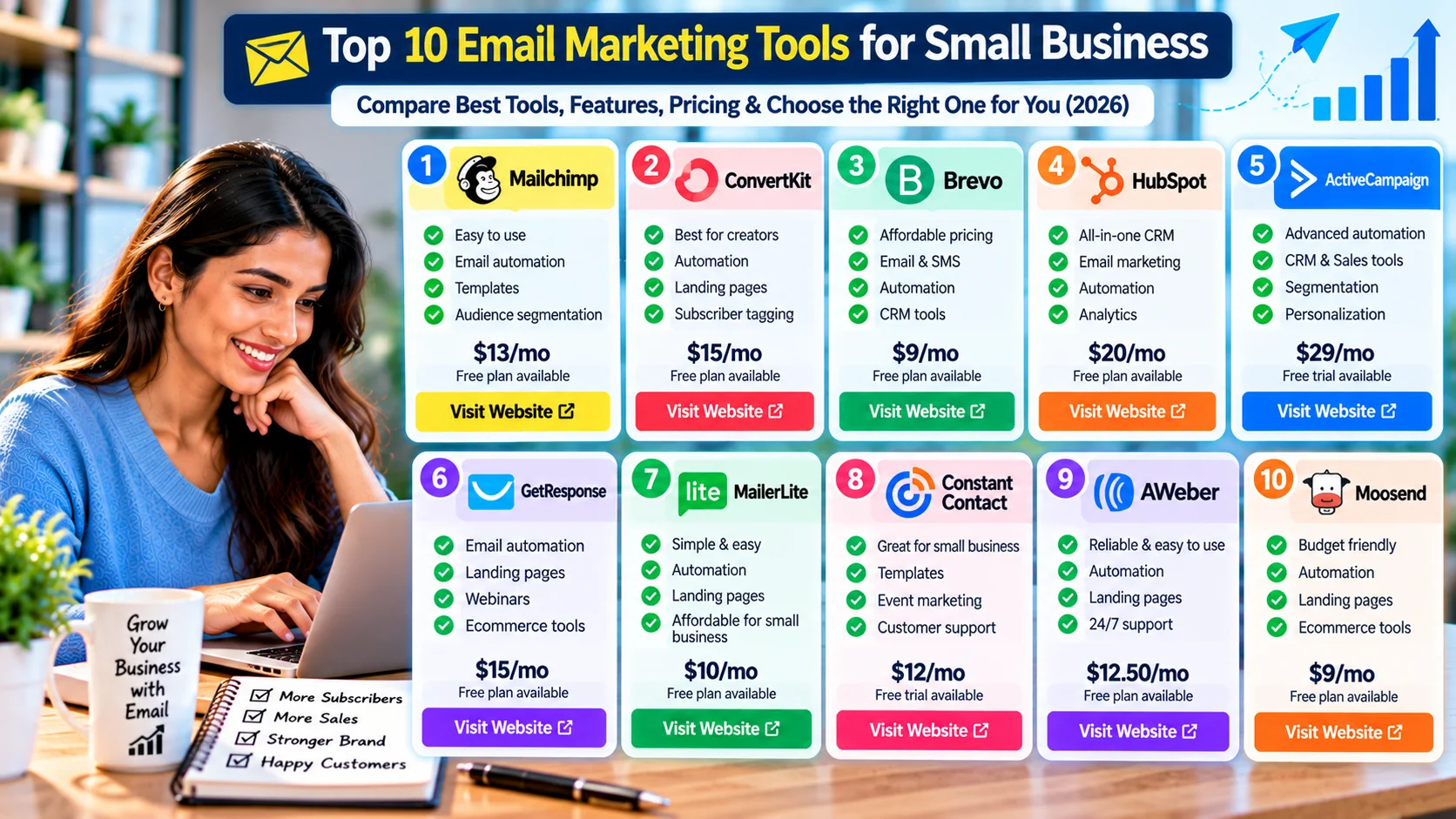
| Platform | What to investigate | Good comparison question |
|---|---|---|
| Mailchimp | Email campaigns, automation, AI content and analytics | Which audience size and AI features fit the plan you would actually use? |
| Kit (formerly ConvertKit) | Creator-focused email, forms, sequences and audience management | Does the creator-oriented workflow match your business model? |
| Brevo | Email, automation, segmentation and multi-channel communication | Do its contact, sending and automation limits match your cadence? |
| HubSpot | CRM-connected marketing, lead capture and automation | Do you need a broader CRM ecosystem or only email marketing? |
| ActiveCampaign | Automation, segmentation and customer journeys | Will the automation depth justify the added complexity and cost? |
| GetResponse | Email, automation, landing pages and broader marketing tools | Do you need its broader marketing features beyond newsletters? |
| MailerLite | Email, landing pages, forms and automation | Does its feature set cover your workflow without unnecessary complexity? |
| Constant Contact | Email, social tools, automation, support and integrations | Do its contact-based pricing and support model fit your business? |
| AWeber | Email campaigns, automation, landing pages and subscriber management | Are its current plans and automation features enough for your needs? |
| Moosend | Email automation, templates and ecommerce-oriented workflows | Does its current pricing and feature mix suit your list size? |
This list is intentionally descriptive rather than ranked. Before signing up, compare current pricing, contact limits, sending limits, automation depth, integrations, AI features, support and deliverability controls on each provider's official website.
Common mistakes to avoid
- Buying a large list: list size is not the same as audience quality.
- Choosing software before defining the workflow: expensive features do not solve an unclear process.
- Automating too much too early: start with one workflow and test it.
- Sending the same message to everyone: use simple segmentation when it changes the relevance.
- Ignoring deliverability: authentication, list hygiene and complaint rates matter.
- Using AI without review: incorrect claims can damage trust.
- Optimizing only open rate: clicks, conversions, leads and revenue may matter more.
- Forgetting exclusions: automated campaigns can overlap unless stop conditions are defined.
- Ignoring legal requirements: email rules vary by country and message type.
How to choose an affordable email marketing setup
If budget is tight, avoid starting with the most advanced plan. First identify the smallest set of features you genuinely need: list management, a reliable email editor, signup forms, one or two automations, basic segmentation and meaningful analytics. Many providers offer free tiers or trials, but free plans often have limits on contacts, sends, features or branding.
Then calculate the cost at your expected list size—not just today's price. A plan that is inexpensive at 500 subscribers may become much more expensive at 5,000. Also account for add-ons, additional users, SMS, premium AI features and overage fees.
Frequently asked questions
Is email marketing still useful for a small business in 2026?
Yes. Email can support newsletters, education, promotions, onboarding and retention. The important part is building a permission-based audience and sending useful, relevant messages.
What is the best email marketing software for a small business?
There is no universal best platform. Compare contact limits, sending, automation, segmentation, integrations, analytics, AI features and total cost against your actual workflow.
Can AI write my small-business emails?
AI can draft and revise emails, but a person should review facts, offers, personalization, tone and claims before sending.
How much does email marketing software cost?
Pricing varies by provider, contact count, sending volume and features. Check current official pricing before purchasing because plans and limits change.
How often should a small business send marketing emails?
Choose a sustainable cadence, set expectations at signup and adjust based on engagement, complaints and business results.
What email marketing metrics should a small business track?
Track delivered messages, clicks, conversions, unsubscribes, complaints and business outcomes such as leads or revenue. Use opens as a directional metric rather than the only measure.
Do small businesses need AI for email marketing?
No. AI is optional. Add it when it saves time or improves a clearly defined task without reducing accuracy or customer trust.
What should I do before sending my first campaign?
Set up authentication, confirm your audience and unsubscribe path, test your email on mobile and desktop, verify links and personalization, send a test and check your tracking.
Sources & official references
- Microsoft — The small business guide to email marketing
- Mailchimp — Email marketing features
- Mailchimp — Current marketing pricing
- Brevo — AI marketing features and plans
- GetResponse — Current pricing
- HubSpot — Current marketing pricing
- Constant Contact — Current pricing
- Google — Gmail sender guidelines FAQ
- FTC — CAN-SPAM compliance guide